
Featured project
Boundary2 — Explainable Compliance Workflows (Concept, tested prototype)
Transparent, consent-based compliance decisions that teams can inspect, challenge, and audit—without invasive employee tracking.
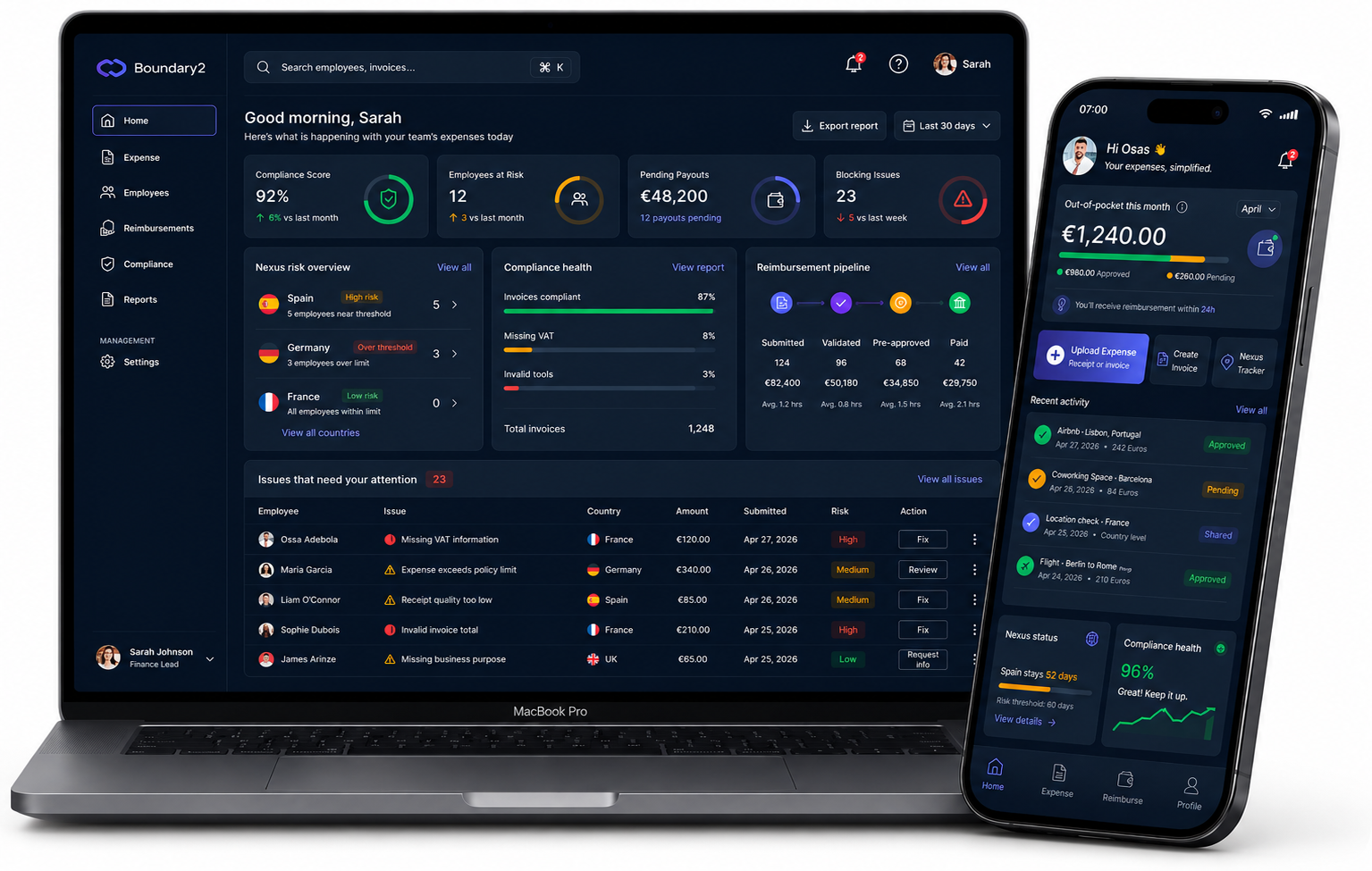
Project Summary
- Project type: Concept project (tested prototype)
- My role: Lead Product Designer (IC), end-to-end
- Duration: 6 weeks
- Users: Compliance reviewers, Finance Ops, employees submitting expenses
- Platforms: Web (compliance), Mobile (employee)
- Validation: 4 prototype sessions (2 employees, 1 finance ops, 1 compliance head) + 4 SME reviews + 3 iterations.
What I was solving
Boundary1 optimized for speed via AI-driven decisioning, but created a trust + auditability gap:
- Compliance teams couldn’t defend decisions quickly, and
- Employees lacked clarity and control over how personal data influenced outcomes.
Key Objectives
- Increase trust in compliance decisions through explainable workflows and transparent evidence trails.
- Balance regulatory assurance with employee privacy using explicit consent and user-controlled data sharing.
- Reduce compliance operational complexity by centralizing workflows, evidence, actions, and audit history in one platform.
What I owned (end-to-end)
- Experience strategy + workflow design (review → exceptions → audit trail)
- Dashboard + employee transparency flows
- Information hierarchy + interaction model
- Design system patterns for explainability (rule breakdowns, confidence, evidence, consent states)
- Prototype + testing plan, synthesis, iteration.
Constraints & Assumptions
Technical & System Constraints
- Factur-X standard reliance: Assumes incoming invoices provide hybrid XML metadata; legacy flat PDFs dynamically fallback to manual review exception flows.
- No continuous tracking: Relies on point-of-capture cryptographic handshakes; UI gracefully handles native GPS API latency timeouts.
- AI assists review but never approves expenses.
Compliance & Legal Assumptions
- Privacy boundary: Boundary2 uses only what’s needed for expense review and auditability—no location tracking, device activity, email content, or other employee monitoring signals.
Operational & User Assumptions
- Explicit user consent: Assumes contractors willingly grant point-of-capture browser/mobile location permissions exclusively at the millisecond of document upload.
-
- Dense viewport optimization: Assumes finance leads use 1440px displays upwards; a strict nested Auto Layout matrix prevents horizontal scrolling and layout breakage.
Key outcomes (what changed)
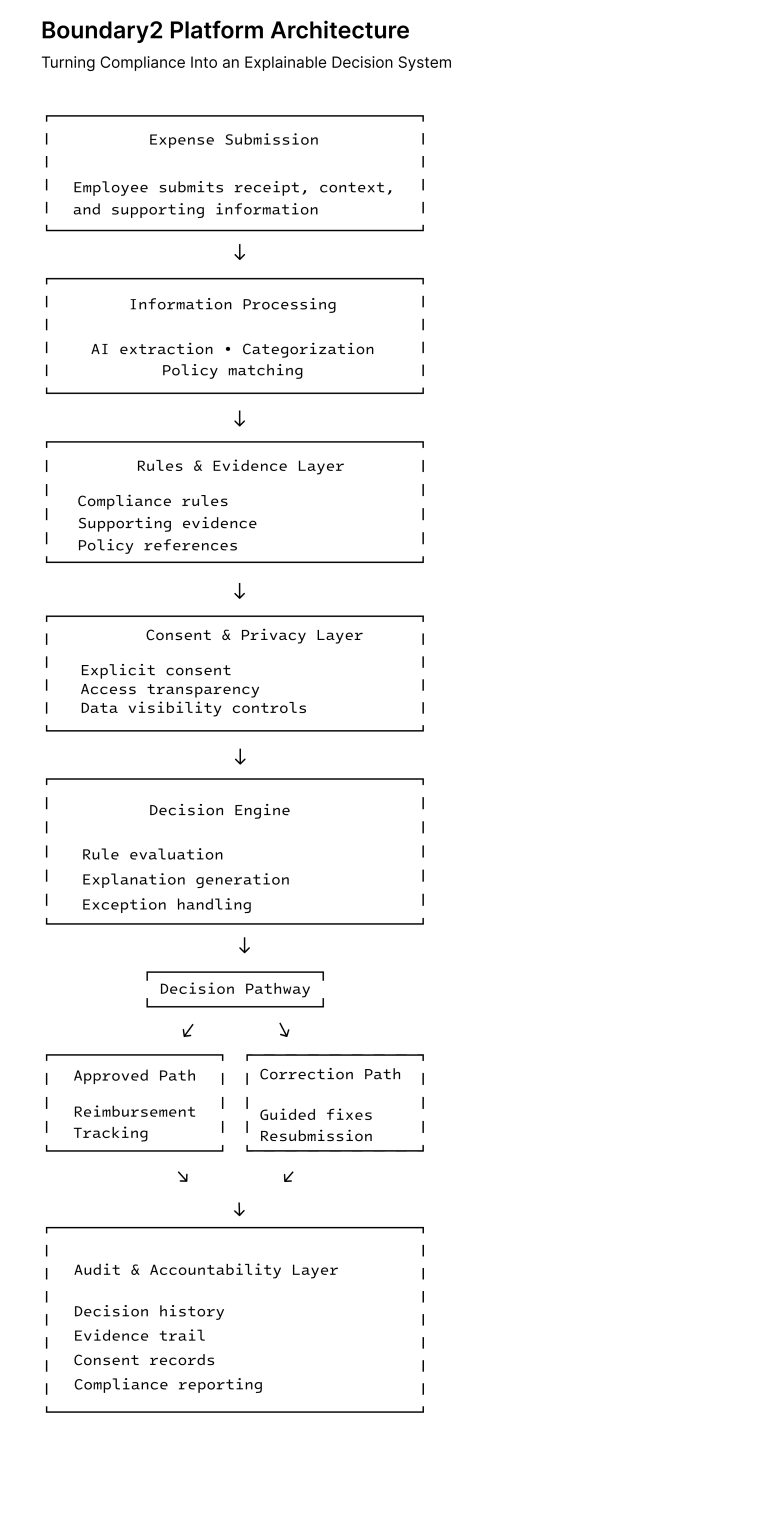
Transformed compliance from a pass/fail outcome into a decision pathway: rules + evidence + actions + audit history in one place, with explicit consent and privacy controls embedded in the workflow.
Explainable Decisions
- Compliance outcomes became traceable through linked rules, evidence, and audit history.
Privacy by Design
- Consent became an active workflow component rather than a legal afterthought.
Shared Operational Model
- Auditors and employees participated in the same compliance ecosystem with clear responsibilities and visibility.
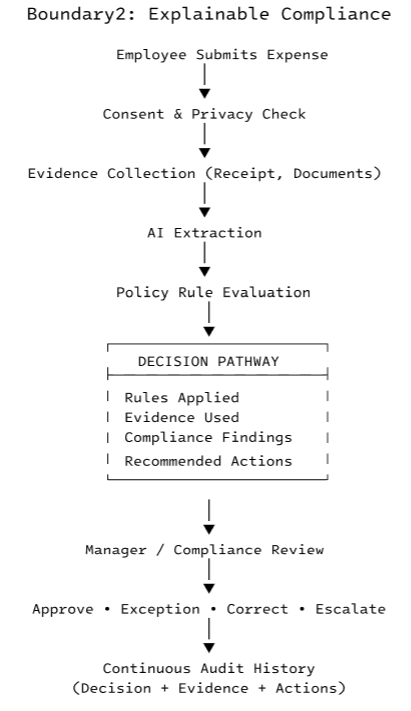
Boundary1 vs Boundary2 Workflow Comparison
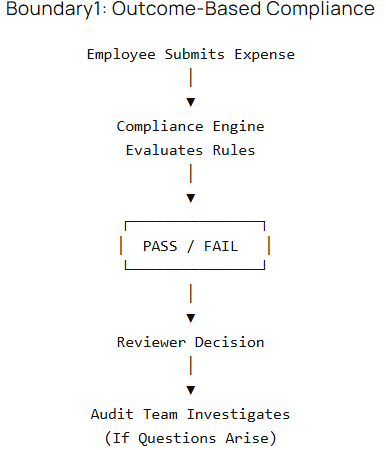
Boundary1 Characteristics:
- Black-box outcome
- Limited explanation
- Audit trail assembled later
- Employees have little visibility
- Privacy controls not explicit
Boundary2 Characteristics:
- Explainable decisions
- Rules linked to evidence
- Embedded privacy controls
- Explicit consent workflow
- Audit-ready by default
Design Shift
Boundary1: Compliance = “Did this pass?”
Boundary2: Compliance = “Why was this decision made, what evidence supported it, what action was taken, and how can it be audited?”
Employee's Consent & Admin's Expense Review Screens
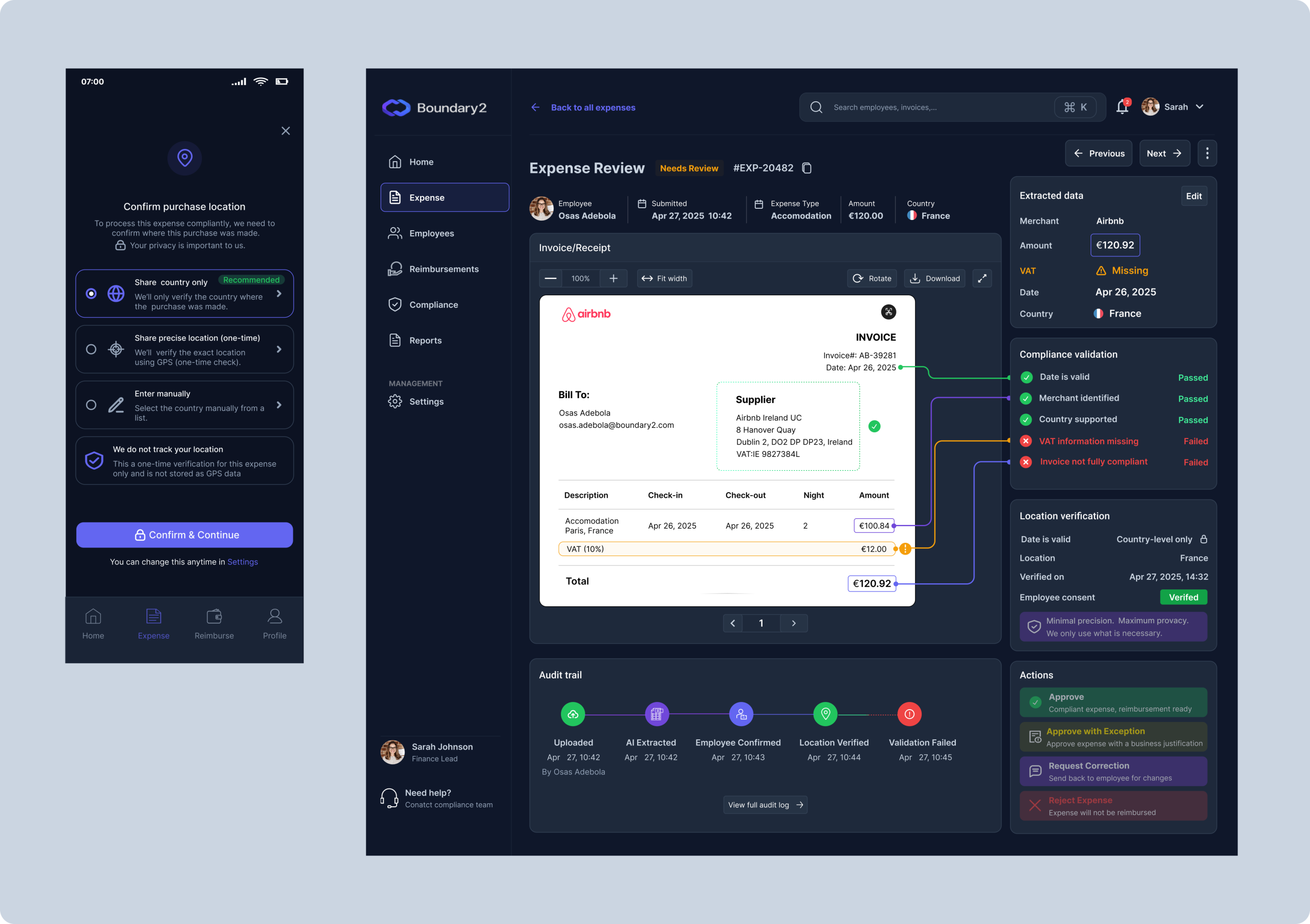
UX success criteria
-
“I can see what matters in <5 seconds.”
-
“I can confidently approve/request correction/reject without hunting for context.”
-
“If someone audits this decision later, it’s defensible.”
Problem
Boundary1 could produce automated compliance outcomes at scale, but it wasn’t operationally trustworthy:
-
Compliance reviewers couldn’t quickly answer: “What rule triggered this?” “What evidence was used?” “Who approved overrides?”
-
Exception review became slow and fragile because decisions weren’t traceable or defensible during audits.
-
Employees experienced the system as opaque—unclear what personal data was collected, how it was verified, and how it impacted compliance decisions.
As scrutiny increases (privacy + financial compliance), a system that can’t explain itself becomes a risk to adoption—regardless of model accuracy.
Insights (from testing + SME feedback)
Through four (4) prototype usability sessions with employees, compliance/finance Ops and 4 reviews with compliance/privacy Ops, I found:
-
Trust isn’t about automation — it’s about inspectability
Insight: Participants were comfortable with automation when they could see rules, evidence, and reasoning
-
Reviewers don’t want “more info,” they want the minimum defensible explanation.
Insight: The right unit is a “decision trail”: rule → evidence → status → next action.
-
Employee trust increases when consent and precision are explicit at the moment it matters.
Insight: Surfacing data usage inline (not buried in settings) reduced privacy concern and confusion.
-
Oversight must be selective to avoid bottlenecks.
SMEs consistently preferred automated clearance for low-risk cases + a prioritized queue for exceptions.
Key UX Decisions & Trade-offs
-
Replaced Continuous Tracking with Explicit Consent
Decision
Verify location only when compliance-relevant events occur.
Trade-off
Lower compliance visibility between events.
Why
Users perceived persistent monitoring as invasive, while event-driven verification provided sufficient audit evidence with significantly higher trust.
-
Prioritized Explainability Over AI Automation
Decision
Expose validation logic, confidence indicators, and evidence trails.
Trade-off
Slightly more complex interfaces.
Why
Research showed users trusted transparent decisions more than highly automated but opaque recommendations.
-
Re-Architected Compliance Operations Around a Desktop Workspace.
Decision
Transitioned Compliance Admin's experience from a mobile approval interface to a dedicated desktop Compliance Command Center.
Trade-off
Increased product complexity by introducing a new surface area and maintaining separate employee and compliance experiences.
Why
Research revealed that compliance work extends beyond approvals. Compliance Admins needed to:
- Investigate validation anomalies
- Monitor nexus exposure
- Prioritize review queues
- Track reimbursement health
- Maintain audit readiness
These activities require simultaneous visibility into multiple datasets and workflows, making a desktop-first environment more suitable than a mobile experience.
Outcome
Created a centralized operational workspace that supports proactive compliance management rather than reactive approval handling.
4. Designed Recovery Flows Instead of Hard Failures
Decision
Guide users through resolution paths when compliance issues occur.
Trade-off
Additional workflow states and edge-case complexity.
Why
Enterprise systems must remain usable when things go wrong, not just when everything works perfectly.
Product Principles
-
Explainability by default — every decision is linked to the rule and evidence that produced it.
-
Privacy-first operation — employee data access is transparent and governed through explicit consent.
-
Audit-ready workflows — compliance records are generated during the workflow rather than reconstructed afterward.
-
Human oversight — automation assists decisions without removing accountability.
-
Correction over rejection — users are guided toward resolution rather than receiving opaque failures.
Solution
I redesigned the compliance experience around a single principle: decisions must be reviewable end-to-end.
That led to four system-level moves:
-
Explainability: show rules + extracted evidence + validation outcomes per decision
-
Employee agency: make data usage, verification precision, and consent visible inline
-
Governance: embed audit trails, overrides, and accountability into the workflow
-
Selective oversight: automate low-risk, escalate exceptions with clear priority and actions
Expense Review Screen
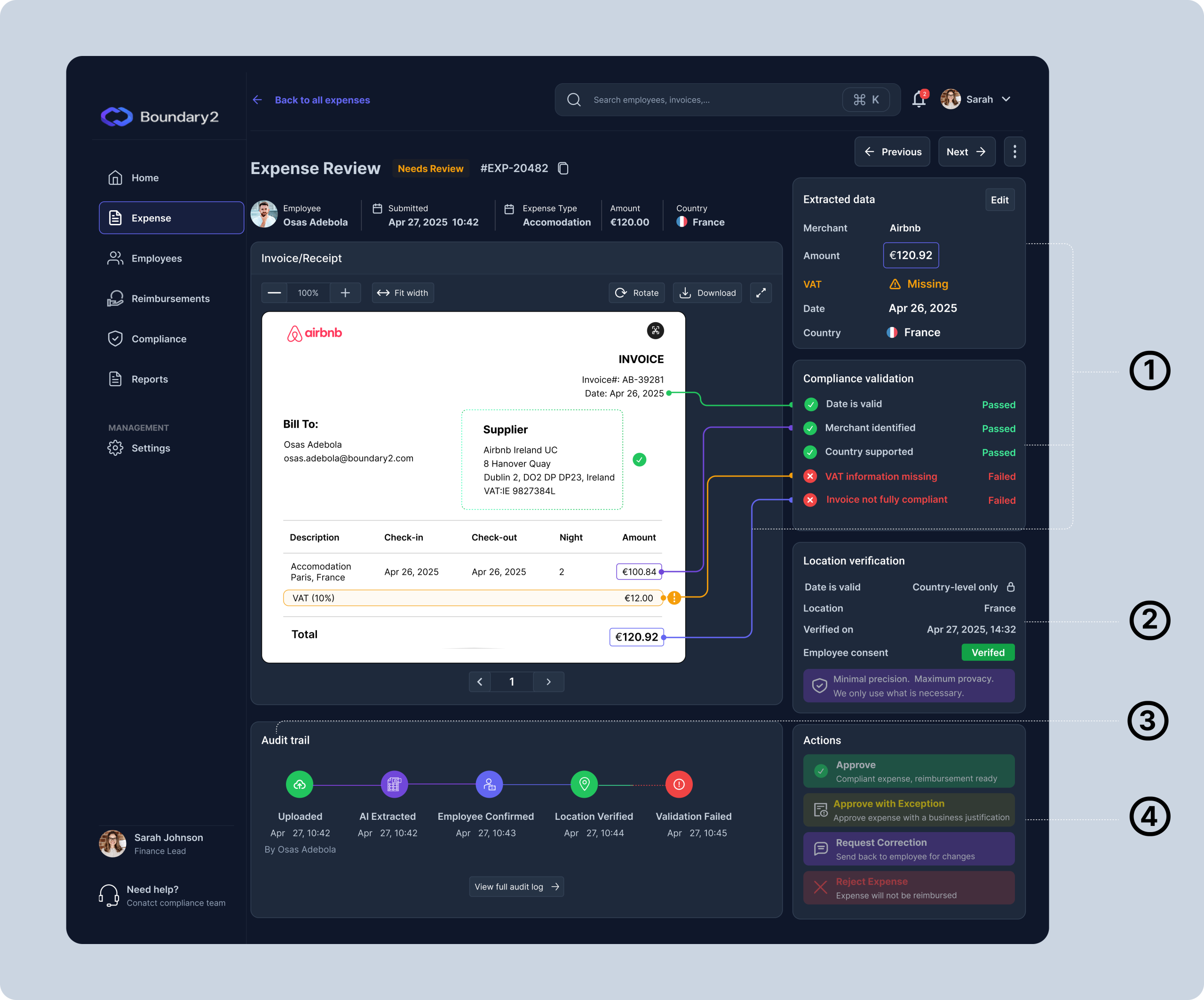
Why this screen matters?
① Explainability
Exposed the rules, extracted data, and validation outcomes contributing to each compliance decision, making automated assessments transparent and easy to review.
② Employee Agency
Made data collection and verification visible within the workflow, giving employees greater clarity and control over how compliance-related information is used.
Why it belongs here
This section tells users:
-
what data is being used
-
how it is being used
-
the precision level being used
-
that consent exists
③ Auditability
Creates a traceable record of approvals, overrides, and issue resolution. Every compliance action remains visible and reviewable, strengthening accountability and supporting audit readiness.
④ Exception Resolution
Enabled reviewers to resolve edge cases through structured actions, ensuring compliance decisions could be challenged, corrected, or overridden when appropriate.
Employee Screens
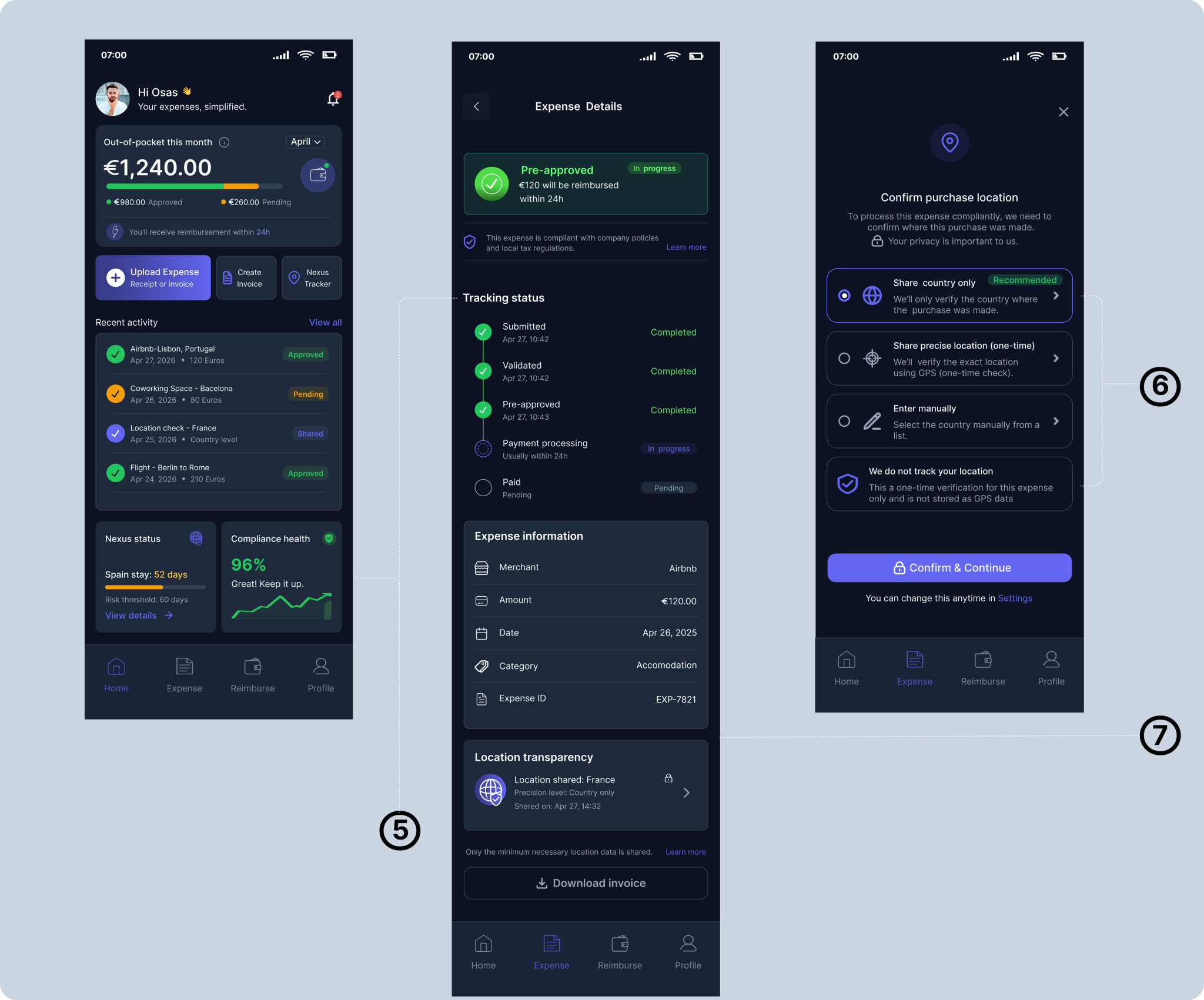
What these screens enable:
⑤ Employee Visibility & Control
Employees can track expenses, understand compliance status, and see how information is being used throughout the review process.
⑥ Privacy-First Verification
Location verification uses country-level precision only, collecting no more data than required for compliance.
⑦ Data Transparency
Compliance outcomes are visible throughout the workflow rather than being hidden behind automated decisions.
Compliance Dashboard Screen
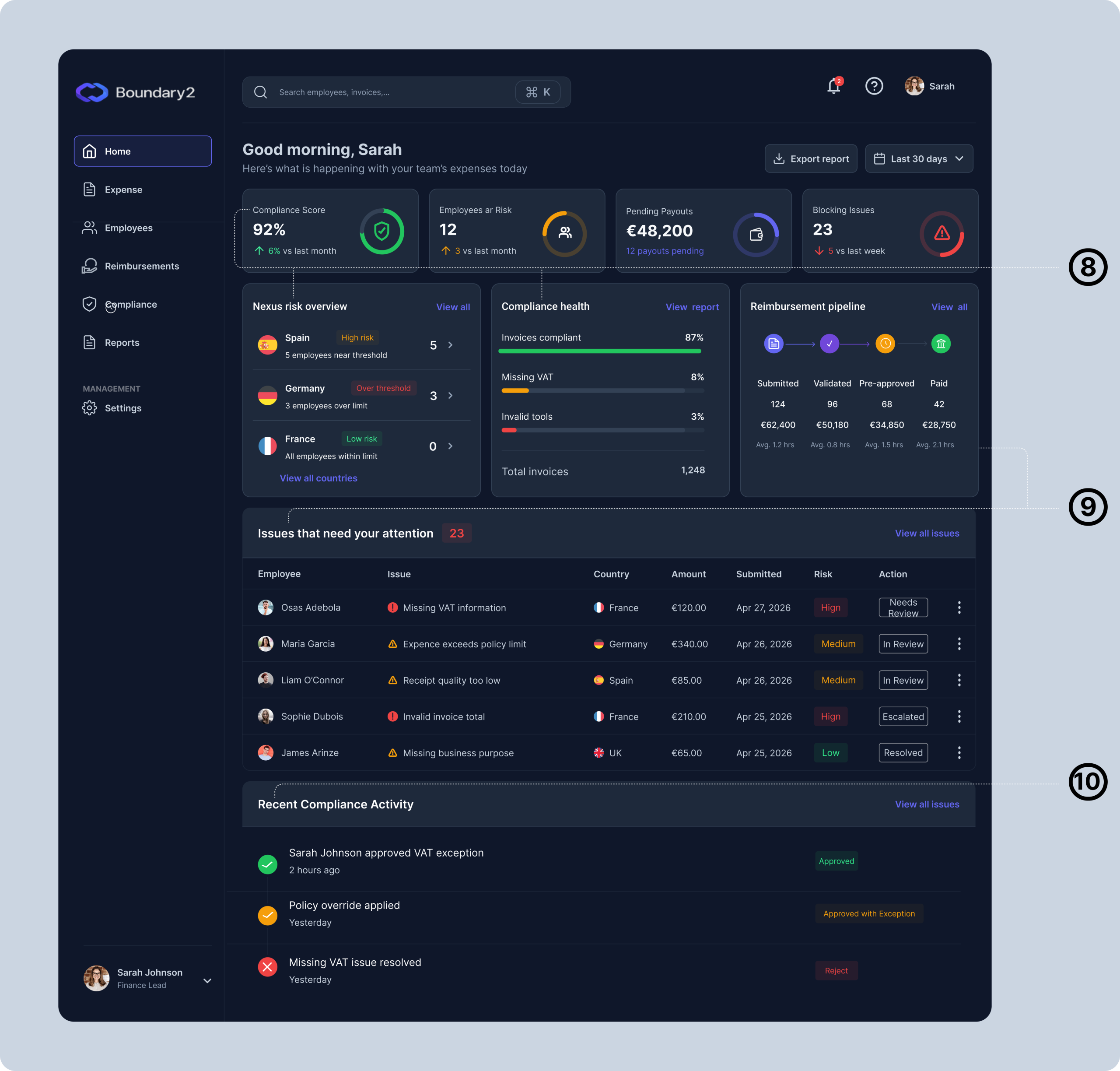
What this screen enables
⑧ Governance Visibility
Provides a real-time view of organizational compliance health, jurisdictional exposure, and policy adherence. By surfacing risk before thresholds are breached, teams can proactively manage compliance rather than react to audit findings.
⑨ Auditability & Accountability
Prioritizes exceptions requiring human intervention while allowing routine expenses to move through automated workflows. Reviewers focus their attention where risk is highest, reducing unnecessary manual effort.
It answers:
What happened?
When did it happen?
Who was involved?
Validation/Outcome
The final solution directly addresses the trust and accountability challenges identified earlier in the project.
How the Solution Addressed the Problem
| Original Challenge | Design Response | Evidence (Test/SME) |
|---|---|---|
| Compliance teams couldn’t justify decisions | Validation breakdown | Every compliance rule is surfaced with pass/fail status |
| Difficult exception handling | Structured review actions | Approve, approve with exception, request correction |
| Employees lacked visibility into data usage | Transparency controls | Consent and location verification displayed inline |
| Limited explainability reduced trust | Explainable compliance engine | Complete decision history shown for every expense |
Validation & Results (Tested Prototypes)
I evaluated Boundary2 through 4 moderated prototype sessions across key perspectives: 2 employees, 1 finance ops, and 1 compliance head. The goal was to validate whether the system felt trustworthy in practice—specifically: decision comprehension, exception resolution, audit defensibility, and privacy confidence.
What testing validated
Explainability worked when tied to a decision trail (rule → evidence → outcome): participants could follow why an expense was approved or flagged rather than treating the result as a black box.
Exception handling felt operational when actions were structured (approve, approve with exception, request correction) and paired with visible reasoning.
Auditability needed to be “built-in,” not implied: the compliance perspective consistently prioritized a traceable history of what happened, when, and who took action.
Privacy trust improved when data usage was explicit in-flow: employees responded more positively when consent, verification method, and precision level were visible at the moment of review—not buried in settings.
What I changed based on feedback
Iteration 1 → 2
Moved compliance validation and supporting evidence higher in the review hierarchy so reviewers could immediately understand why an expense was flagged before examining supporting documentation.
Added a concise "validation summary" pattern to reduce the need to interpret individual compliance checks.
Iteration 2 → 3
Grouped validation results into meaningful categories rather than presenting them as a flat list of rules.
Reduced visual complexity by prioritizing failed and at-risk checks while progressively disclosing passed validations.
SME feedback
Introduced a persistent audit trail showing key review events across the lifecycle of an expense.
Added structured exception actions and reviewer accountability mechanisms to ensure policy overrides remained transparent and defensible.
Refined location verification to emphasize minimum-necessary precision, making privacy protections more explicit during compliance review.
Limitations
This is a tested concept prototype, so results reflect validation signals from sessions and expert feedback rather than production analytics.
Reflection
Boundary2 challenged my assumption that transparency is simply a communication problem. In compliance-heavy environments, transparency is a product capability. Users don't trust systems because decisions are accurate; they trust systems because decisions are understandable, reviewable, and accountable. Designing for trust required treating explainability as a core workflow rather than a supporting feature.